Overview - Sequine Text
Sequine Text is a TextMeshPro animation tool with stackable behaviour. Using the stackable behaviour, you can deicide whether you want to animate it per character or the whole texts, the timings, the colors, etc.
There are some presets available. But if you want to go more advanced, you can also code your own custom text animation behaviour by writing your own Text Behaviour Component.
Interface Overview
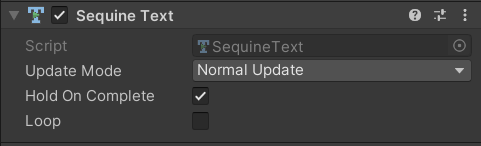
- Update Mode: The update method to evaluate the animation state. There are 5 methods:
- Normal Update: Evaluate in
Updatemethod - Late Update: Evaluate in
LateUpdatemethod - Fixed Update: Evaluate in
FixedUpdatemethod - Unscaled Time: Evaluate in
Updatemethod, ignoring the timescale - Manual: Manually evaluate by calling the
Tickmethod.
- Normal Update: Evaluate in
- Hold On Complete: Hold the last state after the animation has finished. If set to false, then the text will be reverted back to the default look.
- Loop: Loop back the animation on complete.
Playing Text Animation
We have covered on how to play a text animation using Sequine Text and even made an animation sequence in Quick Start, and that is all to it. If you haven't been through it, be sure to check it out.