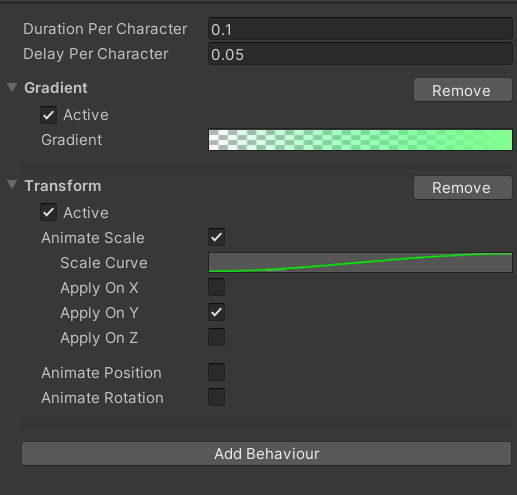
Text Behaviour Profile
Text Behaviour Profile is an asset that contains the concrete profile of the stacked text animation behaviour.
Creating a New Text Behaviour Profile
Create a new Text Behaviour Profile by opening the Assets menu and choose Create -> Sequine -> Text Behaviour Profile. Name the new file to MyTextBehaviour (optional).

Here is how to it looks like in the Inspector.
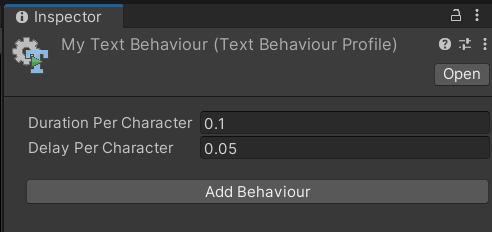
- Duration Per Character: The duration of the animation per character (in seconds).
- Delay Per Character: The delay before the next character's animation being played (in seconds). This is also where we decide to play the animation per character or the whole text at once. For example, if we want to play the whole text at once for 3 seconds, we can set the Duration Per Character to
3, and the Delay Per Character to0.
Adding New Behaviours
To add a new behaviour, we can click the Add Behaviour button to open the Add Behaviour Context Menu.
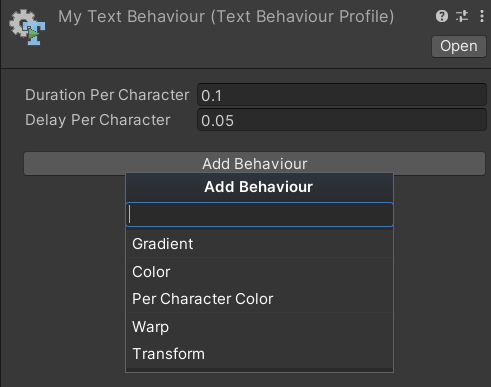
Try to add some behaviours, and you will notice that each of the behaviour has Active field. If set to false, then that specific behaviour will be ignored.