Overview - Sequine Player
Sequine Player is a component that can play Animation Clip on demand without relying on Animator Controller.
Upon changing animation clip, we can also configure the transition to blend the animation clips. We can also add animation layers with certain weights and apply them to certain Avatar Mask.
Although Animator Controller is not required, but we can also use Animator Controller and blend it along with Sequine Player. In Animator component, we can leave the Controller field to None if we don't want to use any Animator Controller. But if we want to blend it with Animator Controller, we can simply set the Controller field. Upon entering Play Mode, you might be confused as to why the assigned Controller field suddenly becomes None. This is because the Animator Controller is already merged with Sequine Player's mixer, and the Controller field have to be cleared in order for Sequine Player's mixer to work.
Interface Overview
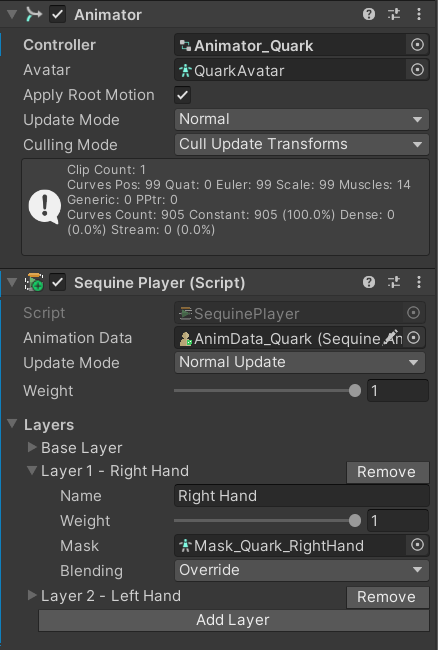
- Animation Data: The cross-scene binder of this Sequine Player. This data also contains managed clip references that we will cover in Manage Animation Clip References section.
- Update Mode: The update method to evaluate the animation state. There are 5 methods:
- Normal Update: Evaluate in
Updatemethod - Late Update: Evaluate in
LateUpdatemethod - Fixed Update: Evaluate in
FixedUpdatemethod - Unscaled Time: Evaluate in
Updatemethod, ignoring the timescale - Manual: Manually evaluate by calling the
Tickmethod.
- Normal Update: Evaluate in
- Weight: Weight to apply the animation. If the weight is 1, it will be fully applied. If the weight is 0, it is not applied at all. We can use the value between 0 and 1 to blend it with the default pose. If Animator Controller is used, then the weight will blend the Sequine Player with Animator Controller.
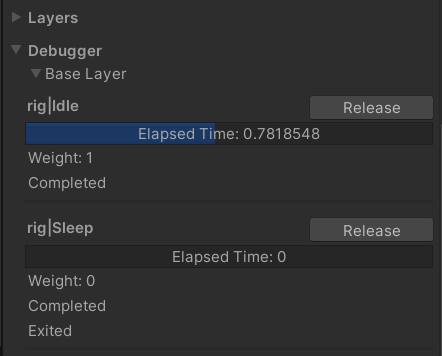
Debugger
When we enter Play Mode, Debugger section will be shown under the Layers section. This visualizes the current states in detail.