替代出口与并行流程
如果你已经阅读过 概览 - Sequine Flow 章节,那么你应该已经了解,每一种 Sequine Flow 都需要一个执行器才能被运行。
Command 执行器负责在特定的 Command 执行线程中执行每一个 Command。它可以包含多个执行线程,以支持并行运行。一个 Command 执行线程被称为 CommandExecutionFlow,简称 flow。
1. 替代出口
我们知道,在执行一个 Command 之后,需要调用 Exit 方法来让流程继续到下一个 Command。在退出时,Command 会通过 GetNextOutputIndex 方法来决定从哪个输出索引继续执行下一个 Command。
默认情况下,如果我们没有重写 GetNextOutputIndex,它会寻找输出索引为 0 的 Command。如果连一个输出都没有,则返回 -1。下面是默认 GetNextOutputIndex 方法的源码示例。
...
    public class Command {
...
        public virtual int GetNextOutputIndex() {
            if (nextIds.Count > 0) return 0;
            else return -1;
        }
...
    }
...
如果我们希望增加另一个 main out-point 作为替代出口,那么就需要让 GetNextOutputIndex 方法返回不同的输出索引。
添加 Main Out-Point
让我们通过创建一个新的 Command 来学习如何添加替代出口。这个 Command 会随机选择要从哪个输出索引继续执行。
打开 Assets 菜单,选择 Create -> Sequine -> C# Command Script,创建一个新的 Command 脚本。将文件命名为 RandomExitCommand(可选)。

我们已经在 自定义 Command 类型 章节中学习过如何添加输出。不过这一次,我们要添加的不是 property out-point,而是 main out-point。
添加 main out-point 的步骤如下:
- 在
Editor_InitOutPoints方法中,为nextIds添加新的连接目标。 - 在
Editor_InitOutPoints方法中,使用CommandGUI.AddMainOutPoint方法添加新的 main out-point。 - 在
Editor_OnDrawContents方法中调用CommandGUI.DrawOutPoint来绘制该 out-point。
...
public class RandomExitCommand : Command
{
    public override void Execute(CommandExecutionFlow _flow)
    {
        Exit();
    }

#if UNITY_EDITOR
    public override void Editor_InitOutPoints()
    {
        base.Editor_InitOutPoints();
        //nextIds at index 0 is the default exit out-point
        if (nextIds.Count < 2) nextIds.Add(new List<ConnectionTarget>());
        CommandGUI.AddMainOutPoint();
    }

    public override void Editor_OnDrawContents(Vector2 _absPosition)
    {
        base.Editor_OnDrawContents(_absPosition);
        CommandGUI.DrawOutPoint(1);
        CommandGUI.DrawLabel("Alternative Exit", true);
    }
#endif
}

重写 GetNextOutputIndex 方法
目前,当我们执行 Sequine Flow 时,RandomExitCommand 总是会从默认的 main out-point,也就是第一个出口离开。
如果想改变这种行为,就需要重写 GetNextOutputIndex 方法。
...
public class RandomExitCommand : Command
{
    public override void Execute(CommandExecutionFlow _flow)
    {
        Exit();
    }

    public override int GetNextOutputIndex()
    {
        return base.GetNextOutputIndex();
    }
    ...
}
我们来修改这个行为,使它在选择输出索引时,在 0 和 1 之间随机取一个值。
...
    public override int GetNextOutputIndex()
    {
        int randomIndex = Random.Range(0, 2);   //randomly select 0 or 1
        return randomIndex;
    }
...
或者,我们也可以把这个值存储在一个全局变量中,这样就不必在 GetNextOutputIndex 内部直接决定要使用哪个输出索引。例如,我们可以在 Execute 方法里先做出这个决定。
...
    private int randomIndex;

    public override void Execute(CommandExecutionFlow _flow)
    {
        randomIndex = Random.Range(0, 2);
        Exit();
    }

    public override int GetNextOutputIndex()
    {
        return randomIndex;
    }
...
上面的代码同样是一种决定输出索引的有效方式。由于 GetNextOutputIndex 方法是在退出执行时才会被调用,那么 Execute 方法显然会在这之前先执行。
多运行几次,你会发现它会在默认出口和替代出口之间随机选择执行。
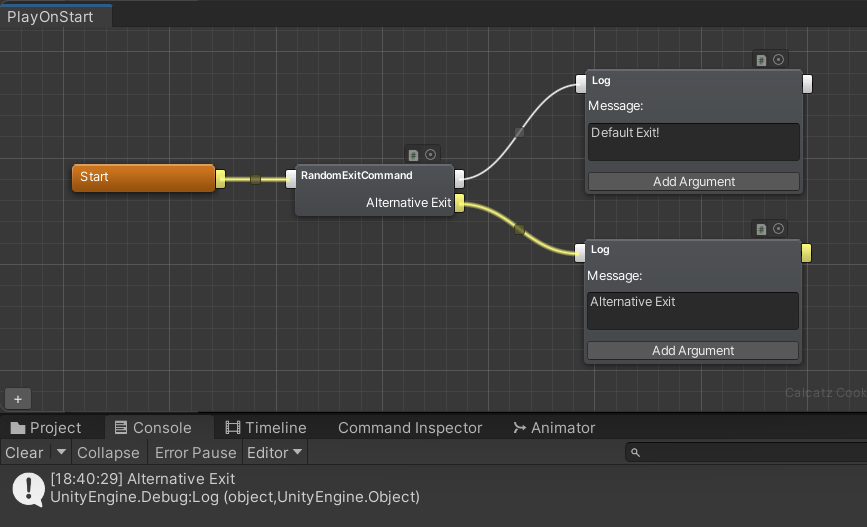
Exit method chooses only 1 output to continue the flow, therefore, Alternative Exit does not create a new flow.
Exit 方法只会选择 一个输出 来继续 flow,因此替代出口 不会创建新的 flow。
2. 并行流程
在很多情况下,我们需要一个 Command 同时从多个输出退出。例如在 Sequine 中,经常会有一些 Command 具有一个用于立即退出的默认输出,以及另一个用于完成时的输出,也就是在任务真正完成的某个时间点触发。
一个 flow 应当按顺序线性地执行 Command。因此,如果要实现并行流程,就需要创建一个 sub flow。从技术上来说,它只是另一个 flow,只不过不是从 Start 节点开始,而是从某个输出所指向的 Command 开始执行。
添加 Main Out-Point
为并行流程添加 main out-point 的方式,与替代出口没有区别。因此,我们可以直接重复之前学到的内容。
这一次不再创建新的脚本,而是扩展现有的 RandomExitCommand.cs。我们将添加一个并行的 main out-point,它会在执行后等待 5 秒再启动。
我们可以使用 CommandGUI.AddRectHeight 方法来在垂直方向增加一些间距。
...
#if UNITY_EDITOR
    public override void Editor_InitOutPoints()
    {
        base.Editor_InitOutPoints();
        //nextIds at index 0 is the default exit out-point
        if (nextIds.Count < 2) nextIds.Add(new List<ConnectionTarget>());   // for alternative exit
        CommandGUI.AddMainOutPoint();

        if (nextIds.Count < 3) nextIds.Add(new List<ConnectionTarget>());   // for parallel flow
        CommandGUI.AddMainOutPoint();
    }

    public override void Editor_OnDrawContents(Vector2 _absPosition)
    {
        base.Editor_OnDrawContents(_absPosition);
        CommandGUI.DrawOutPoint(1);     //draw alternative exit output
        CommandGUI.DrawLabel("Alternative Exit", true);
        CommandGUI.AddRectHeight(5f);
        CommandGUI.DrawOutPoint(2);     //draw parallel flow output
        CommandGUI.DrawLabel("After 5 Seconds", true);
    }
#endif
...
在我们再添加一个 main out-point 之后,它的显示效果如下。
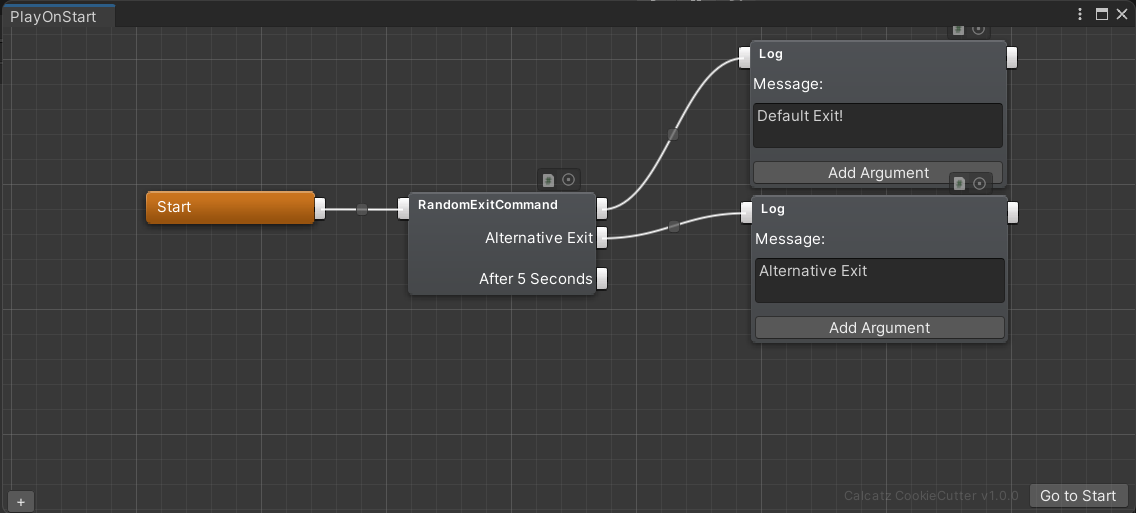
调用 RunSubFlow 方法
现在剩下的就是,真正让这个 main out-point 发挥作用。我们已经决定,希望它在执行后等待 5 秒再启动。在这种情况下,就需要一种能够延迟流程的方式。
我们可以使用 Unity 自带的 Coroutine、async Task,甚至像 DOTween 这样的外部插件。这里我们先使用 async Task。
在运行 sub-flow 之前,必须先创建一个 SubFlowInfo。sub-flow info 必须在 Execute 方法被调用的同一帧创建,通过 _flow.CreateSubFlow(_outputIndex) 方法完成,其中 _outputIndex 是我们希望执行的 main out-point 的索引。在这个例子里,输出索引是 2。
完成之后,就可以在异步方法中调用 RunSubFlow,并使用 ref 关键字传入该 sub-flow info。
...
    public override void Execute(CommandExecutionFlow _flow)
    {
        randomIndex = Random.Range(0, 2);

        SubFlowInfo subFlow = _flow.CreateSubFlow(2);
        WaitFor5Seconds(subFlow);

        Exit();
    }

    private async void WaitFor5Seconds(SubFlowInfo _subFlowInfo)
    {
        await Task.Delay(5000); //5000 miliseconds
        RunSubFlow(ref _subFlowInfo);
    }
...
我们来为这个并行流程设置一个用于输出日志的内容。可以看到,来自 After 5 Seconds 输出的 Log Command 会在 5 秒之后启动。
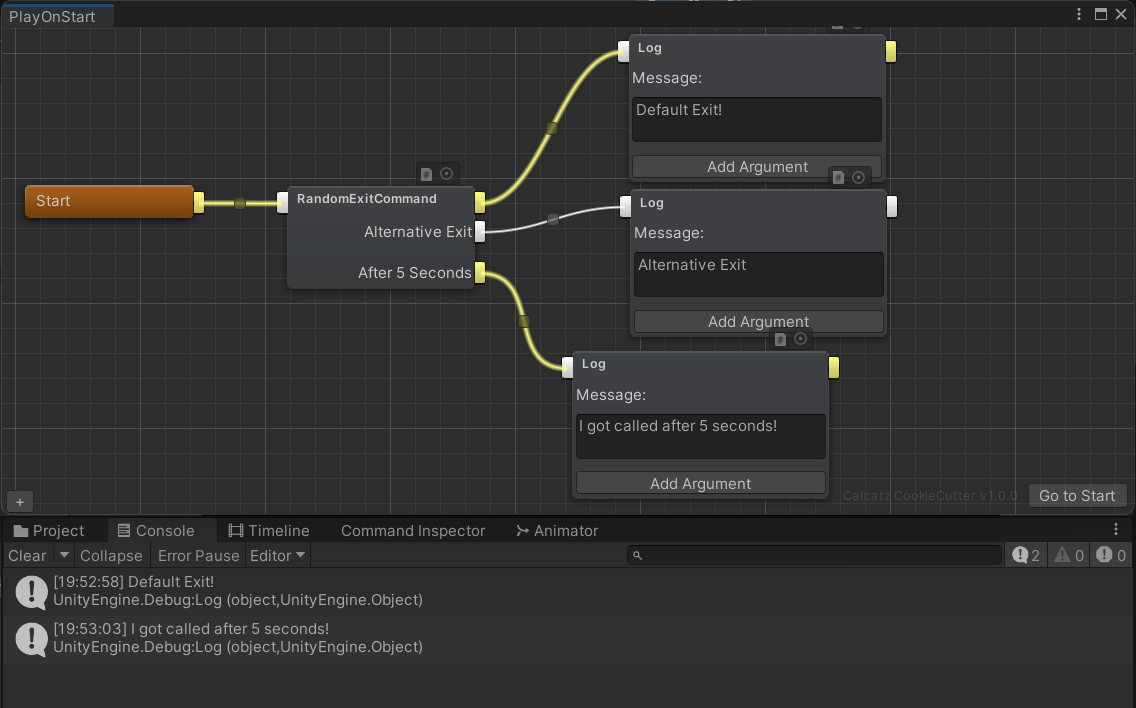
RunSubFlow 会创建一个 新的 flow 上下文。这使得一个 Command 可以同时向 多个后续 Command 继续执行。
完整代码
using System.Collections;
using System.Collections.Generic;
using UnityEngine;
using Calcatz.Sequine;
using Calcatz.CookieCutter;
using System.Threading.Tasks;

[System.Serializable]
[RegisterCommand("Custom/RandomExitCommand", typeof(SequineFlowCommandData))]
public class RandomExitCommand : Command
{
    private int randomIndex;

    public override void Execute(CommandExecutionFlow _flow)
    {
        randomIndex = Random.Range(0, 2);

        SubFlowInfo subFlow = _flow.CreateSubFlow(2);
        WaitFor5Seconds(subFlow);

        Exit();
    }

    private async void WaitFor5Seconds(SubFlowInfo _subFlowInfo)
    {
        await Task.Delay(5000); //5000 miliseconds
        RunSubFlow(_subFlowInfo);
    }

    public override int GetNextOutputIndex() {
        return randomIndex;
    }

#if UNITY_EDITOR
    public override void Editor_InitOutPoints()
    {
        base.Editor_InitOutPoints();
        //nextIds at index 0 is the default exit out-point
        if (nextIds.Count < 2) nextIds.Add(new List<ConnectionTarget>());   // for alternative exit
        CommandGUI.AddMainOutPoint();

        if (nextIds.Count < 3) nextIds.Add(new List<ConnectionTarget>());   // for parallel flow
        CommandGUI.AddMainOutPoint();
    }

    public override void Editor_OnDrawContents(Vector2 _absPosition)
    {
        base.Editor_OnDrawContents(_absPosition);
        CommandGUI.DrawOutPoint(1);     //draw alternative exit output
        CommandGUI.DrawLabel("Alternative Exit", true);
        CommandGUI.AddRectHeight(5f);
        CommandGUI.DrawOutPoint(2);     //draw parallel flow output
        CommandGUI.DrawLabel("After 5 Seconds", true);
    }
#endif
}